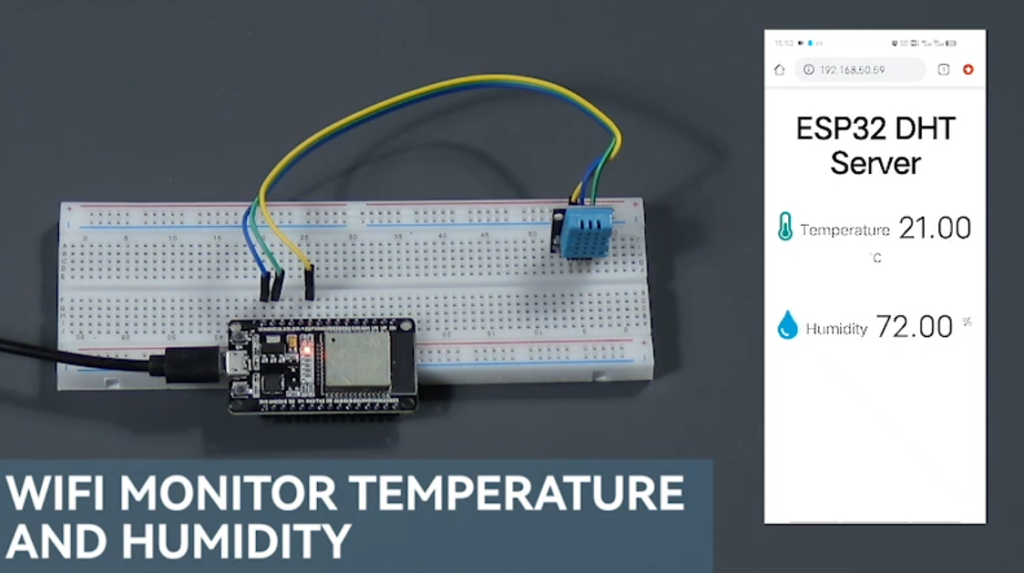
Hardware Connection Diagram
- ESP32 GPIO4 → DHT11 DATA (with 4.7KΩ pull-up resistor)
- ESP32 3.3V → DHT11 VCC
- ESP32 GND → DHT11 GND
Arduino IDE Code
#include <WiFi.h>
#include <DHT.h>

#define DHTPIN 4        // DHT11 data pin connected to GPIO4
#define DHTTYPE DHT11   // DHT11 sensor type
DHT dht(DHTPIN, DHTTYPE);

const char* ssid = "YOUR_SSID";
const char* password = "YOUR_PASSWORD";
WiFiServer server(80);

void setup() {
  Serial.begin(115200);
  dht.begin();

  // Connect to WiFi
  WiFi.begin(ssid, password);
  while (WiFi.status() != WL_CONNECTED) {
    delay(500);
    Serial.print(".");
  }

  server.begin();
  Serial.println("\nHTTP server started at " + WiFi.localIP().toString());
}

void loop() {
  // Read temperature and humidity
  float humidity = dht.readHumidity();
  float temperature = dht.readTemperature();

  // Check for invalid readings
  if (isnan(humidity) || isnan(temperature)) {
    Serial.println("Failed to read from DHT11!");
    return;
  }

  // Handle incoming HTTP requests
  WiFiClient client = server.available();
  if (client) {
    client.println("HTTP/1.1 200 OK");
    client.println("Content-Type: text/html");
    client.println();

    // Display real-time data in HTML
    client.print("<h1>ESP32 Temperature & Humidity Monitor</h1>");
    client.print("<p>Temperature: ");
    client.print(temperature, 1);
    client.print("°C</p>");
    client.print("<p>Humidity: ");
    client.print(humidity, 1);
    client.println("%</p>");

    client.stop();
  }

  delay(2000); // Wait 2 seconds before next reading
}